
Knowledge Center
Getting answers from Syno AI
Syno AI is the assistant in the corner of every page. It answers from our own pages — what we do, what it costs, how to reach us — and hands over to a person when a question needs one.
Here is how to use it.
Using the chat
Four steps, and the first one is new.
Open the chat
Tap the chat bubble in the bottom-right corner of any page. The window opens over the page, and the × in its header puts it back to the bubble.
Ask your question
Type into the box at the bottom of the chat window. English, Bahasa Malaysia, 中文 and 한국어 all work.
Wait for the answer
“Contacting agents…” means Syno AI is searching our pages for the answer. It usually takes a few seconds.
Start a fresh conversation
Open the menu at the top left of the chat window and choose Clear History to wipe the whole conversation.
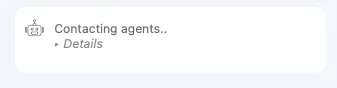
This is what waiting looks like — leave it a moment rather than asking again.
See it working
Asking a question and getting an answer.
Clearing the conversation from the menu.
What it can answer
It is grounded in this site, so it is good at some things and deliberately unhelpful at others.
Our services
What we do across IT consulting, AWS, Synology, enterprise solutions and SynoClaw, and which one fits what you are trying to solve.
What it costs
Setup rates and what they cover. For a quote against your own systems, ask it how to reach us and we will scope it properly.
Getting in touch
Contact details, the WhatsApp number for live support, and the hours a person is actually there.
What it will not do
It answers from Synoteca’s own pages only. Ask it something unrelated and it will point you at the contact page rather than guess.
Syno AI answers at any hour. A person picks up on WhatsApp between 9:00am and 6:00pm (UTC+8), Monday to Friday.
Where to go next
The pages Syno AI is answering from.
Still stuck?
Message us on WhatsApp for live support during working hours, or email sales@synoteca.com and we will come back to you. Built in Kuala Lumpur by Synoteca.